Showing posts with label WebServices. Show all posts

Sunday, 2 November 2014

Creating Sample Webservice In webLogic Using Eclipse IDE


This post explains developing standalone webservice in Weblogic
We will be using Weblogic Application Server and Eclipse to develop a very simple Web Service. 
This tutorial serves two purposes:
  1. Clarifies some basic ideas about creating a web service.
  2. You can use it to create provider services for our OSB, ESB, BPEL examples.


Start your Weblogic server. You need to click this:


  • Now start your Eclipse IDE. In my system, I have one shortcut in desktop.
  • Select File -> New -> Other


  • Select Web -> Dynamic Web Project


  • Give a suitable Project name and Choose to put it into an EAR project(optional).


  • Keep clicking next and finish. If all goes well, you will end up having a Web Project and an Enterprise Application in your workspace:


  • Right click on your dummy web project and click New-> Folder. Name it, say, resources. We will use it to keep our web service artifacts like xsd and wsdl.
  • Right click on your "resources" folder and select New->Other. Then in the dialog, select XML -> XML Schema. Click Next, give a suitable file name and hit Finish. You will have your XSD file opened in the default editor. Use this step twice to create two files, say, provider_req.xsd and provider_resp.xsd.
  • Here is how your request xsd will look like:


  • And here is how our response xsd will look like:


  • Again right click on your resources folder and do a New -> Other to open the dialog. Here choose Web Services -> WSDL and click Next. Give it a name, say, shipmentOrderSrvc.wsdl and click next. In the following screen, choose as shown in the following img. Remember to change the namespace.


  • You will have the wsdl file opened in your workspace. The file is big so the following screenshots split the whole wsdl in several parts:
  • Namespace declarations:


  • The types section of the wsdl:


  • The abstract part of the wsdl:


  • The concrete part of the wsdl:


  • The whole wsdl(sections shrinked):


  • To learn more about xsd and wsdl, please visit w3schools.com .
  • At this point you need to start your server, either from within Eclipse or separately from outside. If you wish to start your server from eclipse, you need to configure it first. These steps can help  http://simplifiedsoa.blogspot.com/2011/12/baby-steps-adding-weblogic-app-server.html :
  • Once you have started the server, you need to create the Java stubs and other classes for your service. No worries, you can do this with right and left clicks only. 
  • Right click on the wsdl you just created. Then select New -> Other and from the dialog, choose Web services -> Web service. Clicking next will start the wizard.


  • In the New Web Serivce wizard, everything is straight forward:


(Note:- For both of the app server and web service runtime, you can choose different values, here we choose Weblogic + Axis as we are using Weblogic Server and Apache Axis comes a web service runtime with it.


  • Now hit finish. It will take some time before you have a big number of packages and classes created in your workspace, something like this:
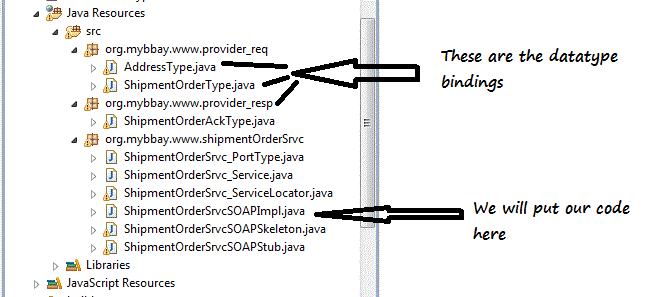


  • Its a good idea to browse through the set of classes and observe how they are formed. Notice the package names; they are almost opposite to what your namespace was, right?
  • In your workspace, you will also find other new artifacts like these:


  • Before your start coding for your web service, and there is not much left for that :), you should have a look at each of these artifacts. They are pretty much self explanatory and will help you better understand the working of the system.
  • Ok. Straight to coding. Open up the file named ShipmentOrderSrvcSOAPImpl


  • So now that we have our code ready, lets not wait anymore. Startup your server and run your application.
  • Remember, you need to be in the J2EE perspective to find the "Servers" tab the bottom of the page. You will find the configured Weblogic server here. Right click and click start.


  • After the server starts, deploy your application. Right click on your application -> Run as -> Run on server:


  • You will see the dialog that will let you choose the app server. Choose it and hit finish.
  • It will take some time before your application gets deployed.
  • After deployment, open the generated wsdl file, i.e., this one:


  • After you open this file, scroll down to the bottom of it and you will find the endpoint, i.e., where your service can be found on the network. Copy it:


  • Open SoapUI. (This is a software you need to use to test your services. Its free and you can get it at soapui.com.)
  • Right click on projects and click new Project.


  • In the dialog that pops up, Enter the endpoint followed by ?wsdl in the Initial WSDL field. Hit Ok.


  • In the left panel, you will find something like this:


  • Double click Request1. It will bring up the SOAP request:


  • You need to put some dummy values in the above step.
  • Now hit the green arrow on the top left. Soon after that you will see the response in the adjoining right window:


Saturday, 1 March 2014

REST services in SOA 11g using HTTP Binding


Invoking REST services in SOA 11g using HTTP Binding 

If you want to invoke HTTP methods like GET or POST in SOA composite application for that HTTP Binding Adapter is available that can be use to invoke REST services. For example if you have a web application that has a servlet that takes HTTP GET request with some parameter and returns an XML response.

So here I am demonstrating with an example. Create a SOA project with empty composite

Create an sample xsd

<?xml version="1.0" encoding="windows-1252" ?>
<xsd:schema xmlns:xsd="http://www.w3.org/2001/XMLSchema"
            xmlns="http://www.example.org"
            targetNamespace="http://www.example.org"
            elementFormDefault="qualified">
  <xsd:element name="Request">
    <xsd:complexType>
      <xsd:sequence>
        <xsd:element name="FName" type="xsd:string"/>
        <xsd:element name="LName" type="xsd:string"/>
      </xsd:sequence>
    </xsd:complexType>
  </xsd:element>
  <xsd:element name="Response">
    <xsd:complexType>
      <xsd:sequence>
        <xsd:element name="Name" type="xsd:string"/>
      </xsd:sequence>
    </xsd:complexType>
  </xsd:element>
</xsd:schema>

Drop a Http Binding adapter in exposed services name it HttpTest click next in HTTP Binding Configuration.


Here you can specify type as service or reference, service type one way or request response, operation name and type of HTTP GET or POST.
In Request message either you can select existing element from a schema or select the wizard to create it .

 
Create a bpel process with Define Service later template


Wire service and bpel process


In Bpel process drop a receive activity with create instance checked and connect it with partner link


 In assign activity use concat function to assign name to output variable.

Deploy the application and for test through web browser
 http://TPCW48LLPC0096.ind.zensar.com:7001/soa-infra/services/default/RestFulService/RestServiceTesting?FName=Deepthi&MName=Mani&LName=Reddy&operationName=Request-Response
Following Response
<Response><Name>DeepthiReddy</Name></Response>
                                                                                                                By Deepthi Reddy 

Compare RESTful Vs SOAP


Understanding SOAP and REST Basics


Simple Object Access Protocol (SOAP) and REpresentational State Transfer (REST) are two answers to the same question: how to access Web services. The choice initially may seem easy, but at times it can be surprisingly difficult.
SOAP is a standards-based Web services access protocol that has been around for a while and enjoys all of the benefits of long-term use. Originally developed by Microsoft, SOAP really isn’t as simple as the acronym would suggest.
REST is the newcomer to the block. It seeks to fix the problems with SOAP and provide a truly simple method of accessing Web services. However, sometimes SOAP is actually easier to use; sometimes REST has problems of its own. Both techniques have issues to consider when deciding which protocol to use.
Before I go any further, it’s important to clarify that both SOAP and REST are protocols: a set of rules for requesting information from a server using a specific technique. The rules are important because without rules, you can’t achieve any level of standardization. The best way to view a protocol is as if it is a diplomat who is making a request on your behalf from another entity. Some people I’ve talked with just don’t understand the entire concept; they have the idea that some sort of magic is occurring. Both SOAP and REST rely on well-established rules that everyone has agreed to abide by in the interest of exchanging information.

A Quick Overview of SOAP

SOAP relies exclusively on XML to provide messaging services. Microsoft originally developed SOAP to take the place of older technologies that don’t work well on the Internet such as the Distributed Component Object Model (DCOM) and Common Object Request Broker Architecture (CORBA). These technologies fail because they rely on binary messaging; the XML messaging that SOAP employs works better over the Internet.
After an initial release, Microsoft submitted SOAP to the Internet Engineering Task Force (IETF) where it was standardized. SOAP is designed to support expansion, so it has all sorts of other acronyms and abbreviations associated with it, such as WS-Addressing, WS-Policy, WS-Security, WS-Federation, WS-ReliableMessaging, WS-Coordination, WS-AtomicTransaction, and WS-RemotePortlets. In fact, you can find a whole laundry list of these standards on Web Services Standards.
The point is that SOAP is highly extensible, but you only use the pieces you need for a particular task. For example, when using a public Web service that’s freely available to everyone, you really don’t have much need for WS-Security.
The XML used to make requests and receive responses in SOAP can become extremely complex. In some programming languages, you need to build those requests manually, which becomes problematic because SOAP is intolerant of errors. However, other languages can use shortcuts that SOAP provides; that can help you reduce the effort required to create the request and to parse the response. In fact, when working with .NET languages, you never even see the XML.
Part of the magic is the Web Services Description Language (WSDL). This is another file that’s associated with SOAP. It provides a definition of how the Web service works, so that when you create a reference to it, the IDE can completely automate the process. So, the difficulty of using SOAP depends to a large degree on the language you use.
One of the most important SOAP features is built-in error handling. If there’s a problem with your request, the response contains error information that you can use to fix the problem. Given that you might not own the Web service, this particular feature is extremely important; otherwise you would be left guessing as to why things didn’t work. The error reporting even provides standardized codes so that it’s possible to automate some error handling tasks in your code.
An interesting SOAP feature is that you don’t necessarily have to use it with the HyperText Transfer Protocol (HTTP) transport. There’s an actual specification for using SOAP over Simple Mail Transfer Protocol (SMTP) and there isn’t any reason you can’t use it over other transports. In fact, developers in some languages, such as Python, are doing just that.

A Quick Overview of REST

Many developers found SOAP cumbersome and hard to use. For example, working with SOAP in JavaScript means writing a ton of code to perform extremely simple tasks because you must create the required XML structure absolutely every time.
REST provides a lighter weight alternative. Instead of using XML to make a request, REST relies on a simple URL in many cases. In some situations you must provide additional information in special ways, but most Web services using REST rely exclusively on obtaining the needed information using the URL approach. REST can use four different HTTP 1.1 verbs (GET, POST, PUT, and DELETE) to perform tasks.
Unlike SOAP, REST doesn’t have to use XML to provide the response. You can find REST-based Web services that output the data in Command Separated Value (CSV), JavaScript Object Notation (JSON) and Really Simple Syndication (RSS). The point is that you can obtain the output you need in a form that’s easy to parse within the language you need for your application.

As an example of working with REST, you could create a URL for Weather Underground. The API’s documentation page shows an example URL of http://api.wunderground.com/api/Your_Key/conditions/q/CA/San_Francisco.json. The information you receive in return is a JSON formatted document containing the weather for San Francisco. You can use your browser to interact with the Web service, which makes it a lot easier to create the right URL and verify the output you need to parse with your application.


Deciding Between SOAP and REST

Before you spend hours fretting over the choice between SOAP and REST, consider that some Web services support one and some the other. Unless you plan to create your own Web service, the decision of which protocol to use may already be made for you. Extremely few Web services, such as Amazon, support both. The focus of your decision often centers on which Web service best meets your needs, rather than which protocol to use.
SOAP is definitely the heavyweight choice for Web service access. It provides the following advantages when compared to REST:
  • Language, platform, and transport independent (REST requires use of HTTP)
  • Works well in distributed enterprise environments (REST assumes direct point-to-point communication)
  • Standardized
  • Provides significant pre-build extensibility in the form of the WS* standards
  • Built-in error handling
  • Automation when used with certain language products
REST is easier to use for the most part and is more flexible. It has the following advantages when compared to SOAP:
  • No expensive tools require to interact with the Web service
  • Smaller learning curve
  • Efficient (SOAP uses XML for all messages, REST can use smaller message formats)
  • Fast (no extensive processing required)
  • Closer to other Web technologies in design philosophy

REST SOAP
Assumes a point-to-point communication model–not usable for distributed computing environment where message may go through one or more intermediaries Designed to handle distributed computing environments
Minimal tooling/middleware is necessary. Only HTTP support is required Requires significant tooling/middleware support
URL typically references the resource being accessed/deleted/updated The content of the message typically decides the operation e.g. doc-literal services
Not reliable – HTTP DELETE can return OK status even if a resource is not deleted Reliable
Formal description standards not in widespread use. WSDL 1.2, WADL are candidates. Well defined mechanism for describing the interface e.g. WSDL+XSD, WS-Policy
Better suited for point-to-point or where the intermediary does not play a significant role Well suited for intermediated services
No constraints on the payload Payload must comply with the SOAP schema
Only the most well established standards apply e.g. HTTP, SSL. No established standards for other aspects.  DELETE and PUT methods often disabled by firewalls, leads to security complexity. A large number of supporting standards for security, reliability, transactions.
Built-in error handling (faults) No error handling
Tied to the HTTP transport model Both SMTP and HTTP are valid application layer protocols used as Transport for SOAP
Less verbose More verbose


                                                                                                              By DeepthiReddy